Choosing the right Mini Pc Windows 10 in 2026 requires more than comparing processor names and low prices. Global buyers must examine hardware reliability, software support, regional warranties, power standards, and genuine licensing. Windows 10 reached mainstream support maturity, but its consumer support ended on October 14, 2025. That changes the buying decision.
Panos Panay, former Microsoft Chief Product Officer, once said, “Windows 10 is the most secure Windows ever.” His statement remains useful, but it needs context. Security depends on current updates, firmware quality, and responsible configuration. A compact computer may look impressive beside a coffee mug, yet weak cooling can reduce performance after hours of video calls. Tiny fans can also become surprisingly loud.
This guide evaluates the 2026 market through practical buyer concerns. We consider Intel and AMD performance, memory upgrade options, storage durability, Wi-Fi stability, USB connectivity, and real-world power consumption. We also examine Windows 10 compatibility, activation status, and the limitations of refurbished models. Some listings appear excellent.
They are not always dependable.
A strong Mini Pc Windows 10 should handle office applications, browser-heavy work, streaming, and light creative tasks without constant thermal throttling. Buyers should not assume that newer processors automatically deliver better value. A quieter, upgradeable system may suit a home office better than a faster sealed model. Regional voltage support and after-sales service also matter, especially when returning hardware across borders becomes expensive. Our recommendations remain practical, but no shortlist is perfect. Availability changes, seller quality varies, and buyers should verify every specification before ordering.
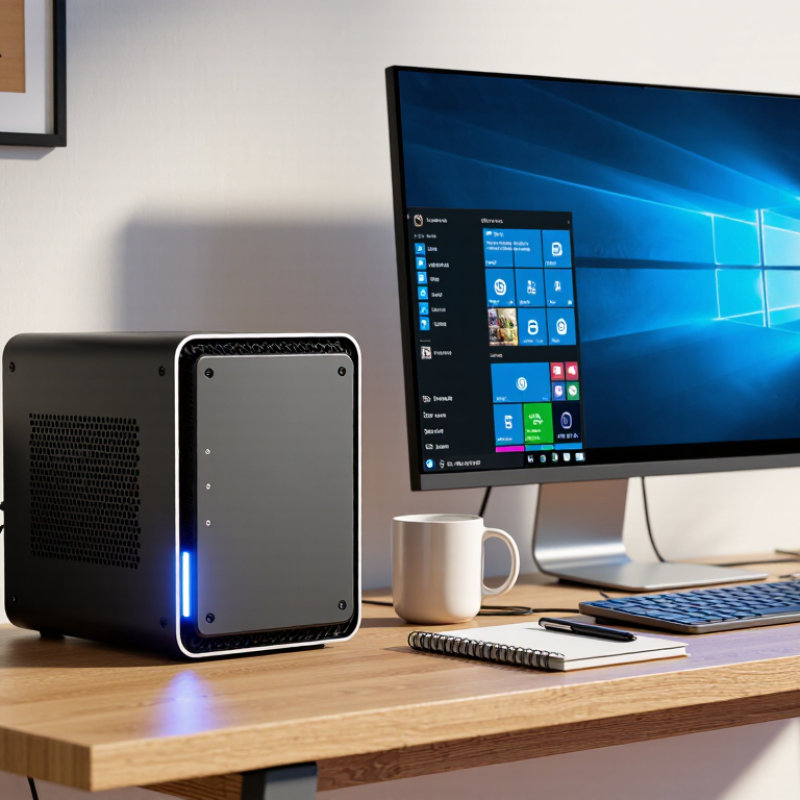
The Windows 10 mini PC market looks practical but complicated for global buyers in 2026. Official lifecycle guidance states that standard Windows 10 support ended on October 14, 2025. That date changes the buying calculation. A low-cost device may still run familiar software, but security updates and long-term support require careful verification.
Gartner reported 245.3 million personal computers shipped worldwide in 2024, showing continued demand despite slower growth. IDC’s Worldwide Quarterly Personal Computing Device Tracker also indicates that commercial replacement cycles remain important. Mini PCs benefit from this trend because they fit small offices, classrooms, kiosks, and home workspaces.
Look for at least 16GB of memory, a solid-state drive, dual-display support, and replaceable storage. Cooling matters. A quiet fan is useful, but weak airflow can reduce performance during long video calls or data work.
Global buyers should check power input, keyboard language, wireless certifications, warranty coverage, and local repair options. A compact case can hide limited upgrade space. That matters later. Independent testing should confirm sustained temperatures, noise levels, and real power consumption, not only short benchmark scores. Reports from ENERGY STAR and regional efficiency agencies can help compare electricity use, although their testing conditions may differ. Windows 10 compatibility is not the same as future readiness. Some buyers may accept that trade-off for legacy applications, but I would reconsider it for new business deployments.
For a 2026 mini PC, compare core specifications before chasing appearance or price. Windows 10 reached its standard support end on October 14, 2025, so buyers need a documented security plan. A device with a newer 64-bit processor, firmware-based security, and upgradeable memory is safer for controlled legacy workloads. IDC reported 262.7 million traditional PCs shipped worldwide in 2024, showing continued demand for compact computing, but shipment volume does not guarantee long-term reliability.
Start with the processor’s sustained performance, not only its advertised boost speed. Four modern cores may handle office work, while six or eight cores suit coding, light editing, and virtual machines. Aim for 16GB of RAM. Choose 32GB for heavier multitasking. Storage should use an NVMe solid-state drive, preferably with a replaceable module. I have seen compact systems slow sharply when heat builds inside a small aluminum case. Cooling matters. A quiet fan is useful, but measurable temperature stability matters more.
Check the ports carefully. Two display outputs, wired networking, several USB ports, and wireless connectivity reduce adapter clutter. Gartner’s 2024 PC market analysis emphasized replacement demand and longer device lifecycles, making repairability increasingly important. Look for accessible screws, standard memory, and clear warranty terms. Power efficiency also deserves measurement; ENERGY STAR computer criteria can help compare idle consumption, although laboratory ratings may not match a dusty office. That is an imperfect test. Your room temperature, workload, and software choices can change the result.
Mini PCs for work should prioritize quiet operation, dependable connectivity, and easy maintenance. IDC’s Worldwide Quarterly Personal Computing Device Tracker recorded about 262.7 million PC shipments in 2024. That demand supports a wider range of compact systems, but specifications still vary sharply.
For office use, choose at least 16GB of memory, a fast solid-state drive, and two display outputs. In real workspaces, a small chassis beside a monitor saves valuable desk space. Dual-network options also help with video calls and shared files. My practical concern is cooling. A tiny fan may sound harmless, yet constant heat can reduce comfort and performance.
Media-focused models need hardware decoding for modern 4K formats, stable wireless networking, and enough USB ports for storage. Light gaming requires stronger integrated graphics, dual-channel memory, and sensible thermal limits. IDC forecasts AI-capable PCs will reach 167 million units in 2026, showing where compact computing is moving. Still, AI labels can distract buyers from basic performance. A useful game may run smoothly at 1080p, but demanding titles will expose the limits quickly. Windows 10 reached standard support’s end on October 14, 2025, according to its official lifecycle schedule. Buyers should verify security support, upgrade options, and regional activation rules before ordering. A lower price is not always lower risk.
Windows 10 compatibility deserves careful checking before buying a mini PC in 2026. Standard support ended on October 14, 2025, so regular security updates are no longer guaranteed. Some systems may receive limited protection through an eligible extended security program, but availability differs by region and license. Do not assume a Windows 10 label means long-term safety.
Check the processor generation, storage controller, graphics, Wi-Fi, Bluetooth, audio, and network drivers. Downloadable drivers should support Windows 10 version 22H2, not only Windows 11. Confirm UEFI settings, Secure Boot options, and activation rules before installation. I have seen compact computers boot correctly, yet lose wireless audio after a clean installation. That small failure can waste hours. Older drivers may also reduce sleep performance, display stability, or battery efficiency. Vendor documentation matters more than a marketplace photograph.
Tips: Ask the seller for the exact model number and driver links. Test every port during the return period. Keep a second computer ready for driver downloads. Store recovery media before changing systems. Windows 10 can still feel familiar and efficient, but its security future is limited. A cheaper mini PC may become expensive when unsupported drivers, missing updates, and uncertain activation appear later. Check local support policies carefully.
2026 Top Mini PC Windows 10 for Global Buyers?
Buying a Windows 10 mini PC in 2026 requires careful timing. Microsoft ended mainstream Windows 10 support on October 14, 2025. Buyers should confirm upgrade eligibility before ordering. A low price may hide future security costs. IDC reported 262.7 million traditional PCs shipped worldwide in 2024. That recovery suggests stronger demand, but mini PC stock still varies by region. Some listings ship with older processors, limited memory, or unclear operating-system licenses.
Power efficiency matters in a small office or bedroom. Check the adapter’s input range, plug type, and measured idle power. ENERGY STAR computer specifications provide useful efficiency benchmarks, although not every international model carries certification. Warranty terms deserve equal attention. A one-year local warranty is easier to use than a three-year policy requiring overseas shipping. Import tax, return postage, keyboard layout, and replacement-part availability can change the real price. Regional availability matters more than glossy specifications.
Tips: Compare the final delivered cost. Ask for the exact CPU model. Request written warranty coverage. Check Windows 11 compatibility. Test sleep and fan noise during the return period. Keep the invoice.
A practical buyer should also inspect seller support before payment. Response time is evidence of reliability. I have found that advertised power figures can be optimistic. That is worth questioning. Some buyers may still prefer Windows 10 for legacy software, but unsupported systems create avoidable risk. A small discount should not outweigh secure updates, accessible service, and dependable power hardware.
The chart compares practical reference ranges for global mini PC purchasing. Price is shown in USD, warranty coverage in months, typical sustained power in watts, and regional availability as the number of major market regions supported. Buyers should also confirm local plug compatibility, voltage requirements, taxes, shipping, return policies, and Windows 10 support status before ordering.
Four modern cores handle documents, browsing, and video calls. Six or eight cores suit coding, light editing, and virtual machines. Check sustained performance, not only the advertised boost speed.
Aim for 16GB of RAM for ordinary office work. Choose 32GB for heavy multitasking or several virtual machines. Upgradeable memory is useful, but not every compact case allows it.
Choose an NVMe solid-state drive for quick startup and responsive applications. A replaceable storage module can simplify future repairs. Tiny drives may fill faster than expected.
Heat can build inside an aluminum enclosure and reduce performance. Check temperature stability during sustained workloads, not just fan noise. Quiet is pleasant, but stable temperatures matter more.
Look for two display outputs, wired networking, several USB ports, and wireless connectivity. Test every port during the return period. One missing port can create daily adapter clutter.
It may run familiar legacy software, but regular security updates are no longer guaranteed. Confirm upgrade eligibility before purchasing. Familiar does not always mean safe.
Request the exact model number and written driver links. Check support for the required operating-system version, wireless audio, graphics, storage, and networking. A computer may boot correctly yet lose wireless audio.
Compare the delivered price, import charges, return postage, plug type, and keyboard layout. Check local warranty service and replacement-part access. The cheapest listing may become expensive later.
Check measured idle power and the adapter’s input range. Room temperature, dust, workload, and software can change results. Laboratory ratings are helpful, but imperfect.
Test startup, sleep, networking, audio, displays, USB ports, fan noise, and sustained performance. Store recovery media before changing the system. I might underestimate this step.
In 2026, a Mini Pc Windows 10 remains a practical choice for global buyers who need compact computing for office work, home learning, digital signage, media playback, or light gaming. This guide explains how to compare processors, memory, storage, graphics performance, connectivity, cooling, and upgrade options before purchasing. It also introduces suitable mini PC categories for productivity, entertainment, and entry-level gaming, helping buyers match hardware with everyday workloads and budget expectations.
Windows 10 compatibility should be checked carefully, including driver availability, firmware support, activation status, security settings, and update options. Buyers should also consider regional factors such as total price, taxes, warranty coverage, return policies, power-plug standards, energy efficiency, shipping time, and local technical support. By evaluating both technical specifications and purchasing conditions, global customers can select a reliable, efficient, and appropriately configured mini PC for long-term use.

JingHong Device